Views: 18
I’ve used BIRD as the routing engine for several projects, including my own company, AMSCLOUD, and Superserver.
When I needed better visibility into BGP sessions, peer states, and prefix updates in monitoring tools such as Cacti and LibreNMS, I ran into one important limitation: BIRD does not ship with native SNMP support.
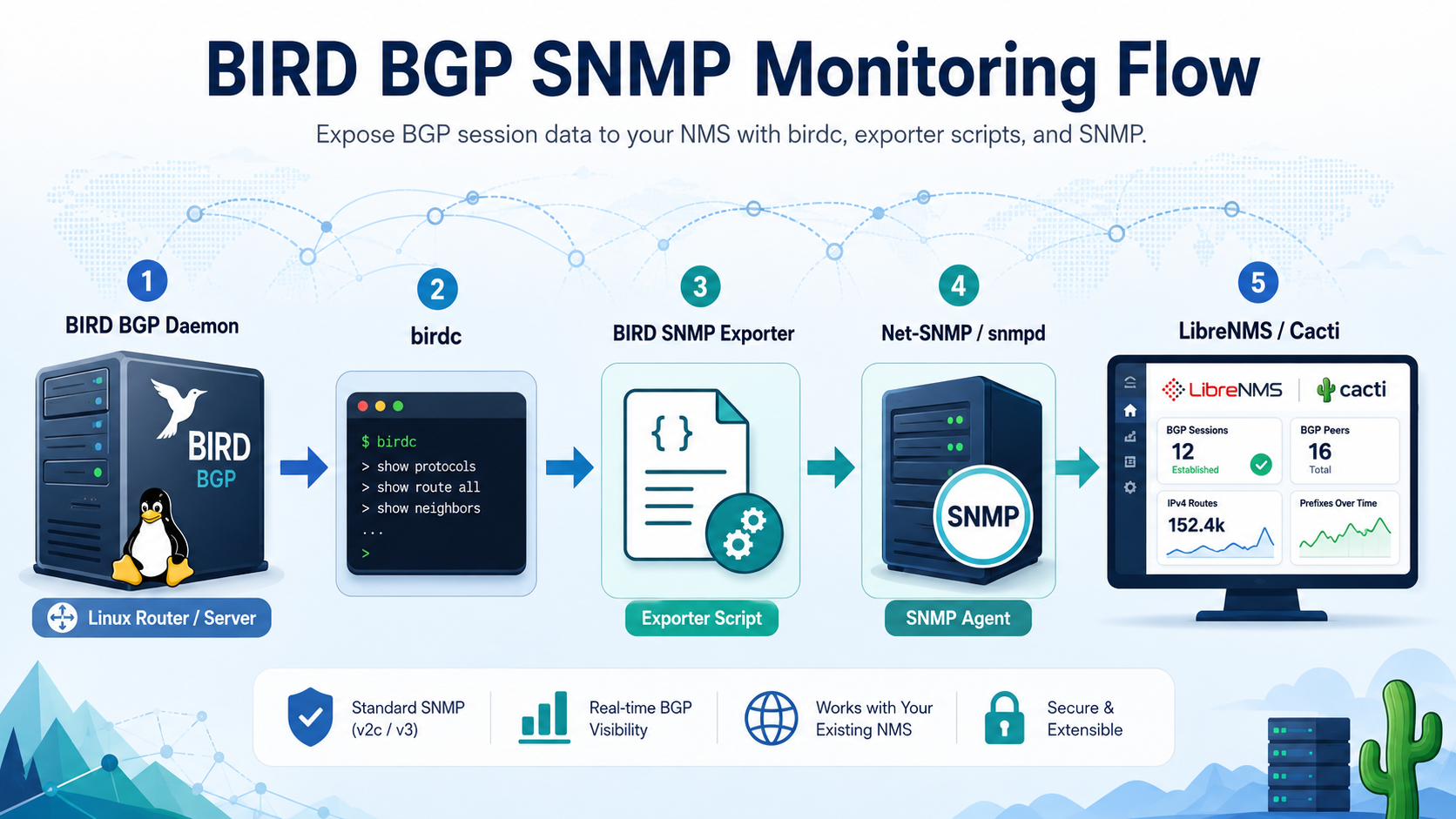
The workaround is to expose selected BIRD data over SNMP using Net-SNMP and a lightweight exporter that parses birdc output. This approach allows an NMS to poll BGP peer health using custom OIDs, create graphs, and generate alerts when a BGP session goes down.
In this article, I’ll walk through the installation, configuration, exporter script, SNMP OID layout, testing, and NMS integration.
1. Architecture Overview
The monitoring flow is simple:
+----------------+        birdc         +---------------------+
| BIRD Routing   |  ----------------->  | BIRD SNMP Exporter  |
| Daemon         |                      | Script              |
+----------------+                      +----------+----------+
                                                   |
                                                   | pass_persist / AgentX
                                                   v
                                        +----------+----------+
                                        | Net-SNMP snmpd     |
                                        +----------+----------+
                                                   |
                                                   | SNMP polling
                                                   v
                                        +----------+----------+
                                        | LibreNMS / Cacti   |
                                        +---------------------+
BIRD remains the routing daemon. Net-SNMP remains the SNMP daemon. The exporter script acts as a bridge between the two systems.
The exporter reads the BGP state from BIRD using birdc, converts the data into numeric SNMP values, and exposes them under a private enterprise OID.
2. What Will Be Monitored
This setup focuses on operational BGP health, especially:
- BGP peer state
- BGP session up/down status
- Imported prefixes
- Exported prefixes
- Preferred routes
- Last protocol change timestamp, if available
- Peer-level health for graphing and alerting
Example use cases:
- Alert when a BGP peer changes from
EstablishedtoIdle - Graph received prefixes per peer
- Graph exported prefixes per peer
- Compare prefix count before and after maintenance
- Monitor route server or transit session health
3. Prerequisites
This guide assumes the server is already running BIRD or BIRD2.
Example environment:
Operating system : Debian / Ubuntu / Rocky Linux / AlmaLinux / FreeBSD
Routing daemon   : BIRD 2.x
SNMP daemon      : Net-SNMP
Monitoring       : LibreNMS or Cacti
Required packages:
sudo apt update
sudo apt install -y snmp snmpd snmp-mibs-downloader python3
For RHEL-based systems:
sudo dnf install -y net-snmp net-snmp-utils python3
For FreeBSD:
pkg install net-snmp python3
4. Verify BIRD Control Socket
Before integrating SNMP, make sure birdc can read protocol status.
Run:
birdc show protocols
Example output:
BIRD 2.15.1 ready.
Name       Proto      Table      State  Since         Info
device1    Device     ---        up     2026-06-20
kernel1    Kernel     master4    up     2026-06-20
bgp_ntt    BGP        ---        up     2026-06-20    Established
bgp_google BGP        ---        up     2026-06-20    Established
bgp_meta   BGP        ---        start  2026-06-20    Active
Also verify detailed protocol output:
birdc show protocols all bgp_ntt
Example output:
Name:       bgp_ntt
Proto:      BGP
Table:      master4
State:      up
Since:      2026-06-20 10:22:44
Info:       Established
Preference: 100
Input filter: ACCEPT
Output filter: ACCEPT
Routes:     950123 imported, 12 filtered, 10 exported, 950123 preferred
BGP state:          Established
Neighbor address:   203.0.113.1
Neighbor AS:        10217
Local AS:           59139
If birdc fails, fix BIRD first before continuing.
Common checks:
systemctl status bird
systemctl status bird6
systemctl status bird2
ls -lah /run/bird/
ls -lah /var/run/bird/
Depending on the operating system and BIRD package, the socket may be located at:
/run/bird/bird.ctl
/var/run/bird/bird.ctl
/usr/local/var/run/bird.ctl
5. Choose a Private Enterprise OID
For custom SNMP data, use a private enterprise OID subtree.
Example OID used in this article:
.1.3.6.1.4.1.55555.1.1
Example structure:
.1.3.6.1.4.1.55555.1.1.1.<peerIndex> = peer name
.1.3.6.1.4.1.55555.1.1.2.<peerIndex> = peer state numeric
.1.3.6.1.4.1.55555.1.1.3.<peerIndex> = imported prefixes
.1.3.6.1.4.1.55555.1.1.4.<peerIndex> = exported prefixes
.1.3.6.1.4.1.55555.1.1.5.<peerIndex> = preferred prefixes
State mapping:
1 = Idle / Down
2 = Connect
3 = Active
4 = OpenSent
5 = OpenConfirm
6 = Established
For alerting, the most important value is:
6 = Established
Any value other than 6 can be considered degraded or down, depending on your policy.
6. Create the BIRD SNMP Exporter Script
Create the script:
sudo mkdir -p /usr/local/libexec
sudo nano /usr/local/libexec/bird-snmp-passpersist.py
Paste the following script:
#!/usr/bin/env python3

import subprocess
import time
import re
import sys

BASE_OID = ".1.3.6.1.4.1.55555.1.1"
BIRDC = "/usr/sbin/birdc"
CACHE_TTL = 15

STATE_MAP = {
    "Idle": 1,
    "Connect": 2,
    "Active": 3,
    "OpenSent": 4,
    "OpenConfirm": 5,
    "Established": 6,
}

cache_time = 0
cache_data = {}


def run_cmd(cmd):
    try:
        output = subprocess.check_output(
            cmd,
            stderr=subprocess.DEVNULL,
            text=True,
            timeout=5
        )
        return output
    except Exception:
        return ""


def get_bgp_protocols():
    output = run_cmd([BIRDC, "show", "protocols"])
    peers = []

    for line in output.splitlines():
        line = line.strip()

        if not line:
            continue

        if line.startswith("BIRD") or line.startswith("Name"):
            continue

        parts = line.split()

        if len(parts) < 2:
            continue

        name = parts[0]
        proto = parts[1]

        if proto == "BGP":
            peers.append(name)

    return peers


def parse_peer_detail(peer):
    output = run_cmd([BIRDC, "show", "protocols", "all", peer])

    bgp_state = "Idle"
    imported = 0
    exported = 0
    preferred = 0

    state_match = re.search(r"BGP state:\s+([A-Za-z]+)", output)
    if state_match:
        bgp_state = state_match.group(1)
    else:
        info_match = re.search(r"Info:\s+([A-Za-z]+)", output)
        if info_match:
            bgp_state = info_match.group(1)

    routes_match = re.search(
        r"Routes:\s+(\d+)\s+imported.*?(\d+)\s+exported.*?(\d+)\s+preferred",
        output,
        re.IGNORECASE
    )

    if routes_match:
        imported = int(routes_match.group(1))
        exported = int(routes_match.group(2))
        preferred = int(routes_match.group(3))

    return {
        "name": peer,
        "state_text": bgp_state,
        "state": STATE_MAP.get(bgp_state, 1),
        "imported": imported,
        "exported": exported,
        "preferred": preferred,
    }


def build_cache():
    global cache_time, cache_data

    now = time.time()

    if now - cache_time < CACHE_TTL:
        return cache_data

    data = {}
    peers = get_bgp_protocols()

    index = 1
    for peer in peers:
        detail = parse_peer_detail(peer)

        data[f"{BASE_OID}.1.{index}"] = ("string", detail["name"])
        data[f"{BASE_OID}.2.{index}"] = ("integer", detail["state"])
        data[f"{BASE_OID}.3.{index}"] = ("integer", detail["imported"])
        data[f"{BASE_OID}.4.{index}"] = ("integer", detail["exported"])
        data[f"{BASE_OID}.5.{index}"] = ("integer", detail["preferred"])

        index += 1

    cache_data = dict(sorted(data.items()))
    cache_time = now

    return cache_data


def get_next_oid(current_oid):
    data = build_cache()
    oids = list(data.keys())

    for oid in oids:
        if oid > current_oid:
            return oid

    return None


def print_value(oid):
    data = build_cache()

    if oid not in data:
        print("NONE")
        sys.stdout.flush()
        return

    value_type, value = data[oid]

    print(oid)
    print(value_type)
    print(value)
    sys.stdout.flush()


def main():
    while True:
        line = sys.stdin.readline()

        if not line:
            break

        cmd = line.strip()

        if cmd == "PING":
            print("PONG")
            sys.stdout.flush()

        elif cmd == "get":
            oid = sys.stdin.readline().strip()
            print_value(oid)

        elif cmd == "getnext":
            oid = sys.stdin.readline().strip()
            next_oid = get_next_oid(oid)

            if next_oid:
                print_value(next_oid)
            else:
                print("NONE")
                sys.stdout.flush()

        else:
            print("NONE")
            sys.stdout.flush()


if __name__ == "__main__":
    main()
Make it executable:
sudo chmod +x /usr/local/libexec/bird-snmp-passpersist.py
Test the script manually:
/usr/local/libexec/bird-snmp-passpersist.py
Then type:
PING
Expected output:
PONG
Press CTRL+C to exit.
7. Configure Net-SNMP
Edit snmpd.conf.
Debian / Ubuntu:
sudo nano /etc/snmp/snmpd.conf
RHEL-based systems:
sudo nano /etc/snmp/snmpd.conf
FreeBSD:
sudo nano /usr/local/etc/snmpd.conf
Add or adjust the following configuration:
agentAddress udp:161

rocommunity YOUR_SNMP_COMMUNITY 127.0.0.1
rocommunity YOUR_SNMP_COMMUNITY 192.0.2.0/24

pass_persist .1.3.6.1.4.1.55555.1.1 /usr/local/libexec/bird-snmp-passpersist.py
Replace:
YOUR_SNMP_COMMUNITY
with your actual SNMP community.
For production, restrict access only from your monitoring server IP address:
rocommunity YOUR_SNMP_COMMUNITY 198.51.100.10
Do not expose SNMP publicly to the internet.
8. Restart SNMPD
Debian / Ubuntu / RHEL:
sudo systemctl restart snmpd
sudo systemctl enable snmpd
sudo systemctl status snmpd
FreeBSD:
sysrc snmpd_enable="YES"
service snmpd restart
service snmpd status
9. Test SNMP Walk Locally
Run:
snmpwalk -v2c -c YOUR_SNMP_COMMUNITY 127.0.0.1 .1.3.6.1.4.1.55555.1.1
Example output:
SNMPv2-SMI::enterprises.55555.1.1.1.1 = STRING: "bgp_ntt"
SNMPv2-SMI::enterprises.55555.1.1.2.1 = INTEGER: 6
SNMPv2-SMI::enterprises.55555.1.1.3.1 = INTEGER: 950123
SNMPv2-SMI::enterprises.55555.1.1.4.1 = INTEGER: 10
SNMPv2-SMI::enterprises.55555.1.1.5.1 = INTEGER: 950123

SNMPv2-SMI::enterprises.55555.1.1.1.2 = STRING: "bgp_google"
SNMPv2-SMI::enterprises.55555.1.1.2.2 = INTEGER: 6
SNMPv2-SMI::enterprises.55555.1.1.3.2 = INTEGER: 1200
SNMPv2-SMI::enterprises.55555.1.1.4.2 = INTEGER: 6
SNMPv2-SMI::enterprises.55555.1.1.5.2 = INTEGER: 1200
Meaning:
.1.<index> = BGP peer name
.2.<index> = BGP state
.3.<index> = imported prefixes
.4.<index> = exported prefixes
.5.<index> = preferred prefixes
If peer state is 6, the BGP session is established.
10. Test from Monitoring Server
From your LibreNMS or Cacti server:
snmpwalk -v2c -c YOUR_SNMP_COMMUNITY ROUTER_IP .1.3.6.1.4.1.55555.1.1
If this fails, check firewall rules.
Example Linux firewall rule:
sudo ufw allow from MONITORING_SERVER_IP to any port 161 proto udp
Example firewalld rule:
sudo firewall-cmd --permanent --add-rich-rule='rule family="ipv4" source address="MONITORING_SERVER_IP" port protocol="udp" port="161" accept'
sudo firewall-cmd --reload
11. LibreNMS Integration
LibreNMS already has an application-style BIRD2 monitoring approach, but if you want to use your own custom OIDs, you can add them as custom OID graphs.
Example custom OIDs:
BGP NTT State
OID: .1.3.6.1.4.1.55555.1.1.2.1
Type: gauge
Unit: state

BGP NTT Imported Prefixes
OID: .1.3.6.1.4.1.55555.1.1.3.1
Type: gauge
Unit: prefixes

BGP NTT Exported Prefixes
OID: .1.3.6.1.4.1.55555.1.1.4.1
Type: gauge
Unit: prefixes
Suggested alert rule:
BGP peer state is not equal to 6
Meaning:
state != 6
This alert will trigger when the peer is not established.
For prefix monitoring, create threshold rules such as:
Imported prefixes lower than expected baseline
Example:
imported_prefixes < 800000
Use a threshold that matches your real network. For a full-route transit peer, the baseline will be different from a route-server, CDN, or private peer.
12. Cacti Integration
In Cacti, create a new Data Input Method using SNMP.
Example data source:
Name: BIRD BGP Peer State
Method: SNMP - Get
OID: .1.3.6.1.4.1.55555.1.1.2.1
Data Type: Gauge
Example graph items:
Peer state
Imported prefixes
Exported prefixes
Preferred prefixes
For BGP state, graphing is useful, but alerting is more important.
For prefix counters, graphing is very useful because it helps detect route leaks, upstream filtering issues, and unexpected route drops.
13. Recommended OID Naming Table
Example peer mapping:
| Peer Index | Peer Name | State OID | Imported OID | Exported OID |
|---|---|---|---|---|
| 1 | bgp_ntt | .1.3.6.1.4.1.55555.1.1.2.1 | .1.3.6.1.4.1.55555.1.1.3.1 | .1.3.6.1.4.1.55555.1.1.4.1 |
| 2 | bgp_google | .1.3.6.1.4.1.55555.1.1.2.2 | .1.3.6.1.4.1.55555.1.1.3.2 | .1.3.6.1.4.1.55555.1.1.4.2 |
| 3 | bgp_meta | .1.3.6.1.4.1.55555.1.1.2.3 | .1.3.6.1.4.1.55555.1.1.3.3 | .1.3.6.1.4.1.55555.1.1.4.3 |
Important note: this simple script assigns peer index based on the order returned by birdc show protocols.
For a small deployment, this is usually enough. For production with many peers, it is better to define a static peer index mapping so OIDs do not change when peers are added or removed.
14. Production Improvement: Static Peer Index
For production use, create a static mapping file:
sudo nano /etc/bird-snmp-peers.conf
Example:
1 bgp_ntt
2 bgp_google
3 bgp_meta
4 bgp_cloudflare
5 bgp_akamai
Then modify the exporter script to read this file instead of dynamically assigning index numbers.
This prevents graph data from moving to the wrong peer when a new BGP session is added.
15. Security Recommendations
SNMP should be treated carefully, especially on internet-facing routers.
Recommended security practices:
- Use SNMPv3 where possible.
- Restrict SNMP access to your NMS IP address only.
- Never expose UDP/161 to the public internet.
- Use firewall rules.
- Use a strong community string if SNMPv2c is still required.
- Do not expose sensitive BGP policy details unnecessarily.
- Monitor
snmpdlogs for polling abuse or unexpected source IPs.
Example SNMPv3 user:
sudo net-snmp-create-v3-user -ro -A 'AUTH_PASSWORD_HERE' -X 'PRIV_PASSWORD_HERE' -a SHA -x AES birdmon
Example SNMPv3 test:
snmpwalk -v3 -l authPriv -u birdmon -a SHA -A 'AUTH_PASSWORD_HERE' -x AES -X 'PRIV_PASSWORD_HERE' 127.0.0.1 .1.3.6.1.4.1.55555.1.1
16. Troubleshooting
Problem: SNMP walk returns nothing
Check snmpd.conf:
grep pass_persist /etc/snmp/snmpd.conf
Restart SNMP:
sudo systemctl restart snmpd
Check logs:
journalctl -u snmpd -f
Problem: Script works manually but not from SNMP
Check permissions:
ls -lah /usr/local/libexec/bird-snmp-passpersist.py
Make sure it is executable:
sudo chmod +x /usr/local/libexec/bird-snmp-passpersist.py
Check whether the snmpd user can run birdc.
Depending on your system, snmpd may run as:
Debian-snmp
snmp
root
Check:
ps aux | grep snmpd
If birdc requires access to the BIRD control socket, adjust socket permissions carefully.
Problem: BGP peers show as down even when established
Run:
birdc show protocols all PEER_NAME
Check whether the output format matches the parser.
Look for:
BGP state:
Routes:
If your BIRD version formats output differently, adjust the regular expression in the script.
Problem: Prefix counters are zero
Check detailed BIRD output:
birdc show protocols all PEER_NAME | grep Routes
Expected line:
Routes: 950123 imported, 12 filtered, 10 exported, 950123 preferred
If the line is different, update the parser.
Problem: OID index changes after adding a peer
Use a static peer index file.
Dynamic indexing is acceptable for lab usage, but static indexing is better for production monitoring.
17. Operational Notes
This exporter is intentionally simple. It does not replace full BGP telemetry, BMP, streaming telemetry, or route collector systems.
However, it is very useful when your monitoring system is already SNMP-based and you need practical visibility into BIRD BGP session health.
For most ISP and hosting environments, this is enough to answer the most common operational questions:
- Is the BGP peer established?
- Did the prefix count drop?
- Is the upstream still sending full routes?
- Is the route server session healthy?
- Did a maintenance window affect BGP?
18. Conclusion
BIRD is a powerful and flexible routing daemon, but it does not provide native SNMP metrics out of the box.
By combining BIRD, birdc, Net-SNMP, and a small exporter script, we can expose BGP health data to traditional NMS platforms such as LibreNMS and Cacti.
This approach is lightweight, easy to audit, and practical for production networks that still rely on SNMP-based monitoring.
The most important metrics to start with are:
BGP peer state
Imported prefixes
Exported prefixes
Preferred prefixes
Once those are available in your NMS, you can create useful graphs and alerts for BGP session health.